Name me an industry, a sector that is not in the race to adopt artificial intelligence. AI models are a major component of this advanced technology that is supposed to surpass human intelligence soon.
This process of overtaking could happen as soon as 2029, as per some experts like Elon Musk. Many others surveyed in a MIT study believe that within the next 20-45 years.
Today, building an AI model that works isn’t enough. Your model should work just fine when data and users grow. It should not crash; it should not slow down or cost a fortune to run. This is what we mean by the scalability of AI.
Python and TensorFlow make a great pair for this challenge. Python features keep development clear and flexible. TensorFlow offers powerful tools to train on large datasets, run models across multiple machines, and even optimize them for mobile or edge devices.
Understanding Scalability in AI
When we talk about scalability in AI, we don’t just mean running a bigger model or adding more layers. It also means making sure your AI can handle real-world growth. This growth can include more data, more users, and more complex tasks.
In practice, this means:
- Training should still finish in a reasonable time, even if your dataset doubles or triples.
- The model should deliver quick predictions, whether it’s serving a few hundred users or millions.
- Your system should adapt to run on multiple machines, GPUs, or even TPUs, without major code changes.
There are two common ways to achieve this:
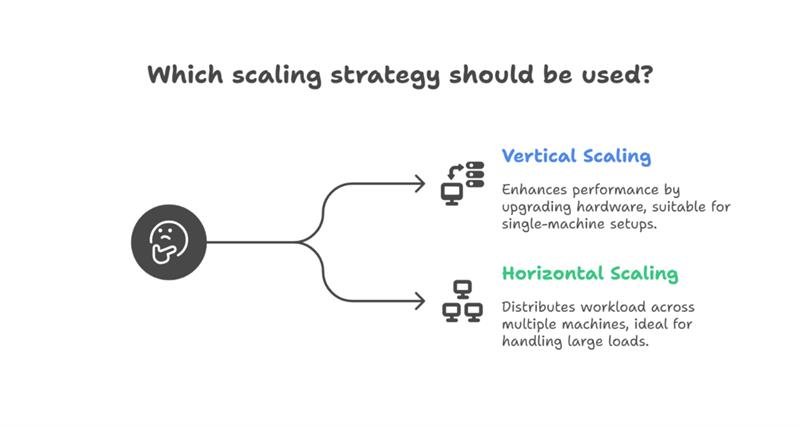
Vertical scaling: Using more powerful hardware, like adding better GPUs or more RAM.
Horizontal scaling: Distributing the workload across multiple machines.
Understanding these basics helps you plan and build AI app solutions that work today and will continue to work as your data and demand grow.
Choosing the Right Architecture & Design Patterns
A scalable AI system starts with the right design or the right AI architecture. Instead of writing one big script that handles everything, it’s better to build your project in smaller and independent parts. This makes it easier to test, scale, and improve over time.
Here are a few practical tips:
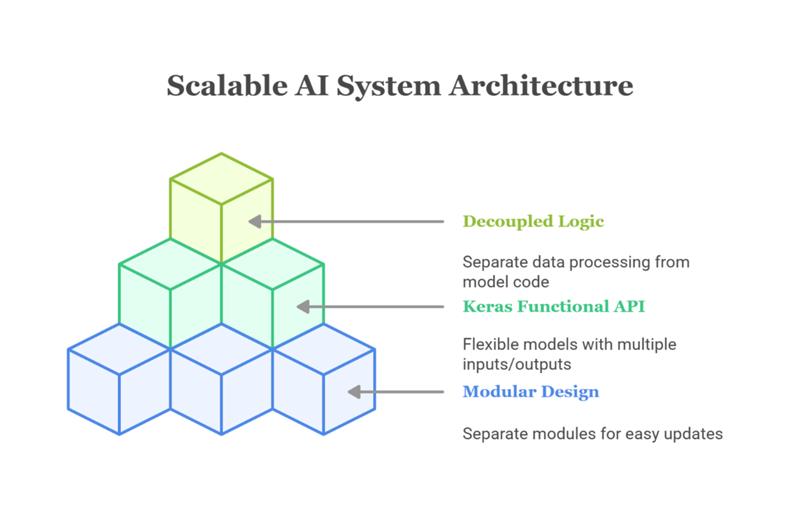
Keep it modular: Separate your data loading, preprocessing, model training, and serving into different modules or scripts. This makes it easier to update or scale each part without breaking the rest.
Use TensorFlow’s Keras functional API: This lets you build more flexible models like ones with multiple inputs or outputs, which can be very useful in real-world tasks.
Decouple data and model logic: Instead of mixing data processing directly into your model code, use dedicated data pipelines. This helps you swap datasets, use larger batches, or add new preprocessing steps without touching your model architecture.
Note: These design choices might seem small, but they make a huge difference when your AI project moves from prototype to production.
Data Pipelines that Scale
Feeding data efficiently into your model is just as important as the model itself, especially when working with large datasets.
TensorFlow’s tf.data API is designed exactly for this. It helps you:
- Stream large datasets directly from disk or cloud storage, so you don’t have to load everything into memory.
- Batch and shuffle data to keep training balanced and fast.
- Apply preprocessing on the fly, like resizing images or normalizing values, instead of doing it upfront.
Here’s a simple example of an input pipeline:
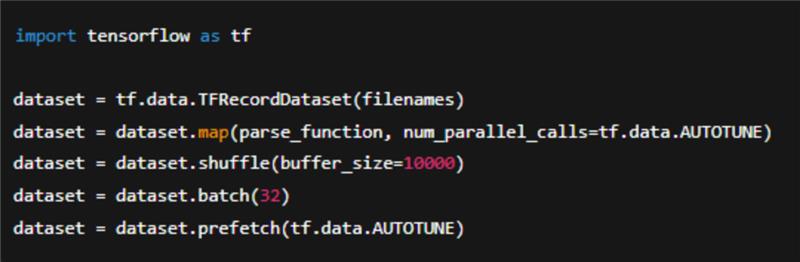
This pipeline streams data efficiently, uses parallel processing to speed up parsing, and prefetches batches, so the model is never waiting for data.
By designing your data pipeline this way, you make sure your model can handle larger datasets without slowing down, which is an essential part of building truly scalable AI.
Distributed Training in TensorFlow
As your datasets grow or your models become more complex, training on a single machine might take too long. Distributed training helps you speed this up by using multiple GPUs, TPUs, or even multiple machines at once.
TensorFlow makes this easier with built-in distribution strategies:
MirroredStrategy: Best for training on multiple GPUs within one machine.
MultiWorkerMirroredStrategy: Use this when you have several machines, each with GPUs.
TPUStrategy: Optimized for training on TPUs, which can handle very large models and datasets.
Here’s a simple example using MirroredStrategy:

Benefit of this is that your code structure mostly stays the same. You just add a distribution strategy around your model. This saves you time and avoids major rewrites as you move from small experiments to large-scale training.
Model Optimization for Production
Even the best-trained model isn’t useful if it’s too slow or too large for real-world use. Once training is done, it’s time to make your model leaner and faster for deployment.
Here are some practical techniques:
Quantization: Converts your model weights from 32-bit floats to 16-bit or 8-bit integers. This can reduce the model size dramatically and speed up inference, often with only a small drop in accuracy.
Pruning: Removes unnecessary or less important weights from the model. This makes it lighter and faster without fully retraining.
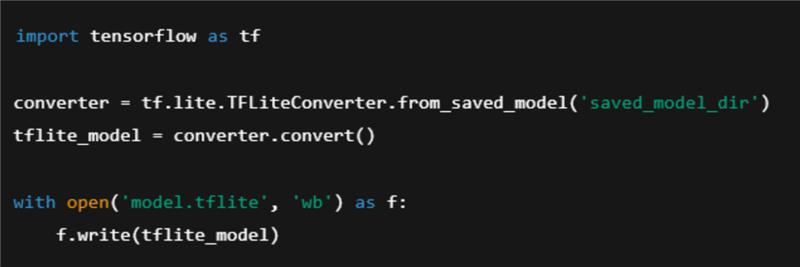
TensorFlow Lite: Ideal if you want to run your model on mobile phones, edge devices, or IoT hardware.
Example: converting a trained model for mobile deployment:
Serving & Deployment at Scale
Once your model is trained and optimized, you need a way to deliver fast and reliable predictions to your users. At that time, it should not matter how many requests come in.
TensorFlow Serving is a powerful tool for this. It lets you:
- Serve your trained models over HTTP (REST API) or gRPC.
- Load new versions of the model without downtime.
- Automatically handle multiple models if needed.
A typical deployment flow might look like this:
- Package your model and serve it using TensorFlow Serving.
- Use a web server or API gateway to route user requests to your model.
- Deploy in containers using tools like Docker or Kubernetes to handle scaling and load balancing.
For larger systems, Kubernetes can help:
- Start more instances of your model server when traffic increases.
- Restart failed containers automatically.
- Distribute traffic evenly across servers.
Monitoring & Continuous Improvement
Don't think that launching your AI model is the end. In my opinion, it’s really the start of a cycle.
Over time, user behavior changes and data patterns shift, which can reduce your model’s accuracy. That’s why monitoring is very important.
Here’s what you can do:
Track model performance: Use tools like TensorBoard or custom dashboards to watch metrics such as accuracy, latency, and error rates in real time.
Detect model drift: Keep an eye on differences between the data you trained on and the data your model sees in production. Significant drift usually means it’s time to retrain.
Set up feedback loops: Collect real-world data, label it if needed, and use it to retrain and improve your model.
Conclusion
I know I am repeating, but AI development services that work are only the first step. Making sure it stays fast, efficient, and reliable as data and user demands grow - that’s what makes it truly scalable.
The combination of Python and TensorFlow gives you modular design, efficient data pipelines, distributed training, and production-ready serving.
I recommend to start small, design smart, and keep improving. That’s how you go from an idea in a notebook to an AI system that delivers real value.
About the Author
Nikhil Verma is a writer, tech strategist, and self-confessed AI optimist. For over four years, he’s helped bridge the gap between complex tech concepts and everyday business values.
Outside of words and code, you’ll catch him exploring new cafes, playing football, debating AI ethics, or just enjoying the quiet.